

Product Description

Technician Points
Audio: NO
WatchDog: YES
AES-NI: YES
Cooling mode: Fan
Processor:Intel Denverton Atom C3808 (12MB Cache, 12 core 2GHz,AES-NI)
Graphics:ASPEED AST2400
Mini SAS: only supports SAS to SATA
Memory:Support 2*DDR4L SO-DIMMs 2400MHz,Max.64G
Hard Disk:support 2*M.2 for SSD(M key,Type:2280,pcie3.0x2),1*2.5inch SSD/HDD
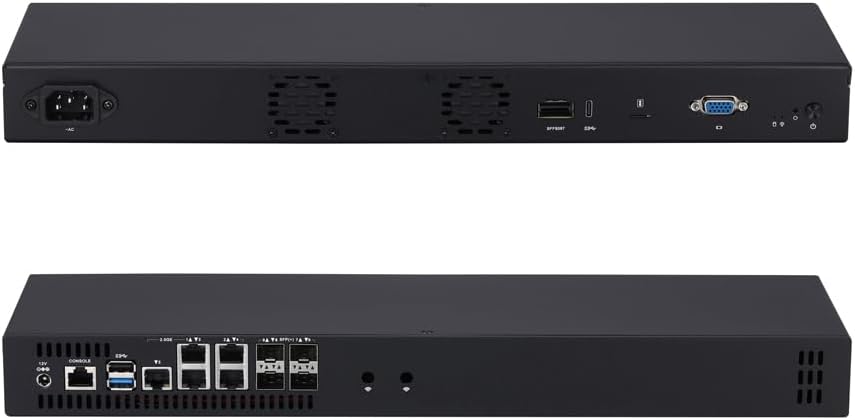
LAN:4x 10G SFP+,5x Intel I226-V 2.5 Gigabit LAN(B3 Version)
I/O Description

Front Panel:
1 x DC Jack1 x RS-232 (RJ-45) port1 x USB 3.0 port1 x USB 2.0 port5 x Intel I226-V 2.5G LAN port4 x 10G SFP+ port

Back Panel:
1 x Power Button 1 x Reset Button 1 x Power LED 1 x HDD LED 1 x VGA (DB15) port1 x Nano SIM Slot 1 x Type C (USB 3.0) port1 x Mini SAS (SFF8087)port

Packing list
1 x Mini PC
2 x Rack ears
plug cord (we arrange it based on your country)
Some replacement screws
The memory list we suggest(first boot takes time,please be patient)

LOGO
LOGO:
1.Sliver logo for printing: White background,and ORIGINAL logo documents in PDF version.
2.boot logo: JPG version, black background,and resolution 800*600
Attention,we accept returning motherboard,RAM,Storage only,if the alluminum alloy case with logo,please understand.
We pre-install NO LICENSE win10,you can also install OS and software package by yourself. F11 key boot from USB Drive. Delete key enter into BIOS.
System:
You can send message for BIOS,driver and user manual.
You can ask for changing BIOS settings such as Wake on lan,Restore from AC power Loss when you place order.
We do not provide 3G/4G/5G module and SIM card.
CPU:Intel Denverton Atom C3808 Processor,12core,2GHz,12M Cache
8G DDR4 RAM;512G M.2 SSD;NO WIFI;5x Intel I225-V/I226-V 2.5G LAN,4x 10G SFP+
Ports:5×2.5G LAN,4x10G SFP+,1RJ45 RS232,1 Type C,1 Nano SIM slot,VGA,1xMini SAS,1xUSB3.0,1xUSB2.0
440*127*44mm(L*W*H),Compatible with Windows 10, Linux, and pfSense, it’s suitable for firewall, NAS, and virtualization applications.
Support power failure Auto-on:Step 1: Power up your MINI PC and press “DEL” to enter BIOS. Step 2: Inside BIOS menu,select the boot option to find a setting named “automatic power on” and enable this setting.


