

Product Description


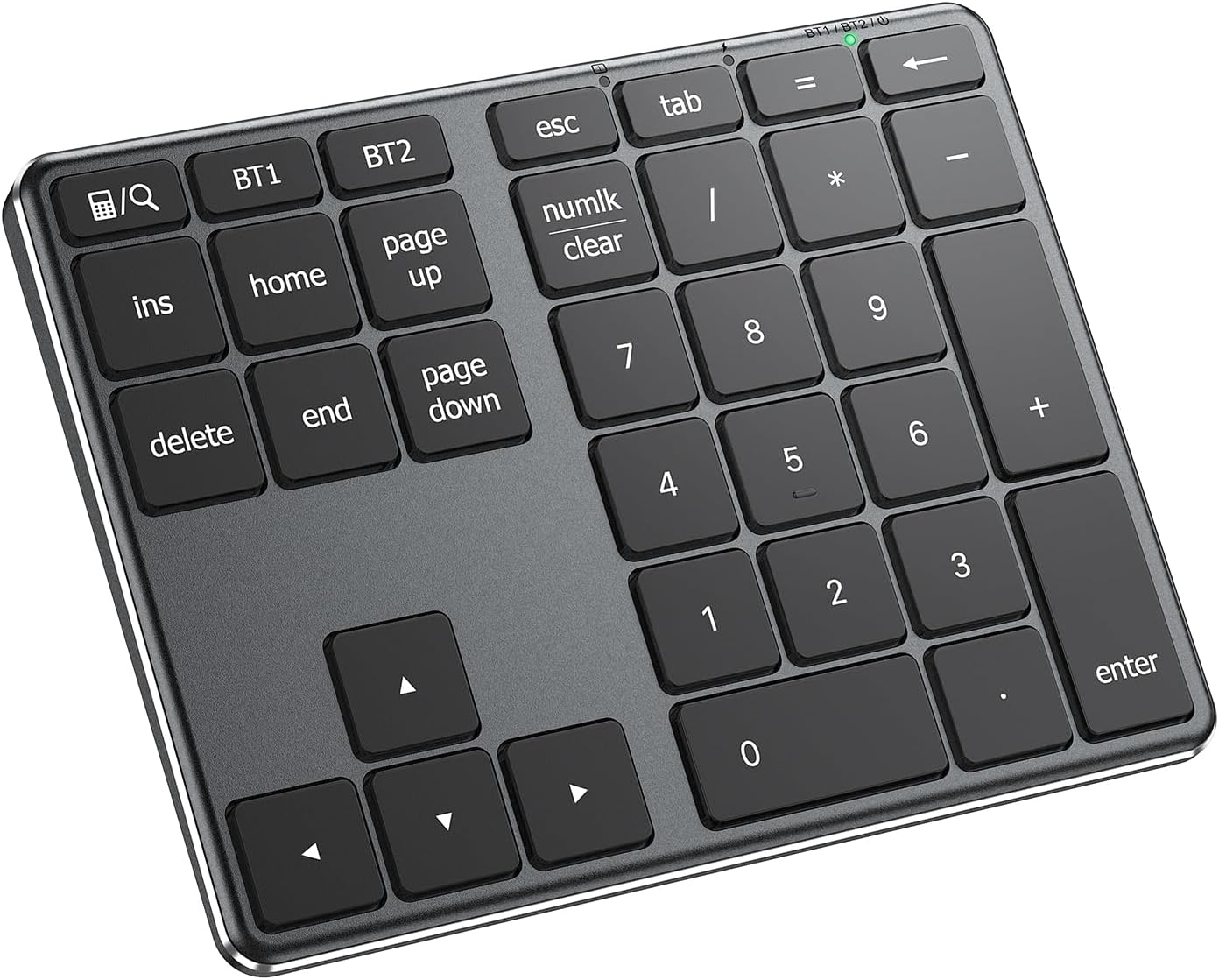
iClever KP10 Bluetooth Number Pad
External numpad for your keyboard
Partner For Laptops
This 34-keys wireless number pad equipped with multiple useful shortcuts which can meet all you need of a number keyboard! It also perfect for left-handed users.
Kindly Note
Works as a calculator apply to Windows systemWorks as search function apply to macOS/iOS system
Features Bluetooth Number Pad Multi-Devices Connection 34 Scissor Switch Keys USB-C Charging Metal Build Broad Compatibility


Add to Cart
Add to Cart
Add to Cart
Customer Reviews
4.5 out of 5 stars 484
4.5 out of 5 stars 55
4.5 out of 5 stars 484
3.9 out of 5 stars 52
Price
$32.99$32.99 $34.19$34.19 $36.99$36.99 $21.99$21.99
Number of Keys
34 35 34 22
Connection Type
2*Bluetooth 3*Bluetooth 2*Bluetooth 1*Bluetooth
Compatibility
Mac, Windows, Chrome OS, iPad OS, iOS, Android Mac, Windows, Chrome OS, iPad OS, iOS, Android Mac, Windows, Chrome OS, iPad OS, iOS, Android Mac, Windows, Chrome OS, iPad OS, iOS, Android
Features
Pair up to 2, Slim, Lightweight, Portable, USB-C Charge, Calculator, Search, Backspace Pair up to 3, Slim, Lightweight, Portable, USB-C Charge, Calculator, Search, Backspace Pair up to 2, Slim, Lightweight, Portable, USB-C Charge, Calculator, Search, Backspace USB-C Charge, Slim, Comfortable Typing, Lightweight, Pocket Size, Calculator, Backspace
Q: Calculator key or Numlk key doesn’t work
The calculator key works as “Calculator” on Windows and works as “Search” on macOS/iOS.
The Numlk key works as “Number lock” on Windows and works as “Clear” on macOS.
Q: Keyboard gets delayed frequently/input repeats
Lag and repeat problems are usually caused by signal interference, please use the following troubleshooting to solve the issue.
1. Verify the iClever is connected to the built-in Bluetooth instead of an external Bluetooth adaptor.
2. Make sure that the iClever and your device are within close proximity.
3. Try moving away from metal and other sources of wireless signal.
Any device that could emit wireless waves: cordless phone, wireless speaker, WiFi router, computer power supplies. Metal or metal wiring in the wall
4. Try disconnecting ALL other wireless accessories to verify the interference issue.
5. Charge the iClever for an hour.
6. Try using it on another device to verify the issue
Note: the input smoothness could be affected in the following situations
Multiple wireless accessories that the device connectsFirst few seconds after you switch over devices or wake them upPC case placed under the desk, signal blocked
Q: Charging tips
The charging indicator would stay red while charging and turn green after fully charged.
Please charge the keyboard with a charger’s voltage below 5V or with a computer USB port. Otherwise, it would probably cause the keyboard to shut down.
Q: Can’t operate the computer by the USB cable
The USB cable serves for charging only. You can’t use it to operate your device.
Smarter, Faster Input: Handle data like a pro with 34 essential keys — calculator, PgUp, PgDn, Insert, and more. Designed for accountants, students, and anyone who needs speed.
Dual-Device, Wide Compatibility:Connect 2 devices and switch easily — compatible with Windows, Mac, iOS, Android, and Chrome OS. Perfect for laptops, tablets, and phones.
Stable & Ultra-Slim Build:Crafted with a stainless steel base, ABS top cover, and smooth scissor switches, this number pad is slim, sturdy, and built to last over 5 million keystrokes.
USB-C Fast Recharge:Quick 1-hour charging powers up to 100 hours of use. Stay productive without worrying about battery life.
Worry-Free Purchase Guarantee: Includes a 34-key Bluetooth keypad, USB-C charging cable, and user manual. Enjoy a 12-month hassle-free warranty and lifetime responsive customer support- We’re here whenever you need us.


